ZOWIE EC1-CW Alternatives: Best Ergonomic Wireless Gaming Mice
The BenQ ZOWIE EC series is legendary in competitive gaming circles. Known for its perfect, right-handed ergonomic asymmetry, the EC shape remains the gold standard for many FPS pros using palm or claw grips. When ZOWIE announced the wireless EC1-CW, it was a game-changer, promising the classic shape paired with flawless 2.4GHz wireless performance.
The Agitation: Finding the Perfect EC1-CW Ergonomic Wireless Clone
For gamers seeking the competitive edge provided by ZOWIE’s focus on performance and shape, the EC1-CW is often the ultimate target. However, achieving that specific combination of a substantial ergonomic body, minimal weight, and flawless low-latency wireless connectivity can be challenging, especially when looking for immediate availability or alternative feature sets.
The typical user looking for the ZOWIE EC1-CW is not just looking for *any* wireless mouse; they are looking for a precision instrument. They prioritize ergonomic comfort that supports the entire hand, competitive wireless speed (2.4 GHz dongle, not just Bluetooth), and premium sensor tracking. If the exact EC1-CW model isn’t the right fit due to size, price, or availability, finding an alternative that respects these core requirements is crucial for maintaining top-tier performance.
The Solution: Top Wireless and Ergonomic Mice for Competitive and Comfort Grips
We have curated a list of the best wireless and ergonomic alternatives available that capture the essence of the ZOWIE EC1-CW—whether you need uncompromising gaming speed, superior comfort for long work/play sessions, or a versatile hybrid design. These options range from ultra-lightweight speed demons to full-sized, wrist-friendly ergonomic powerhouses.

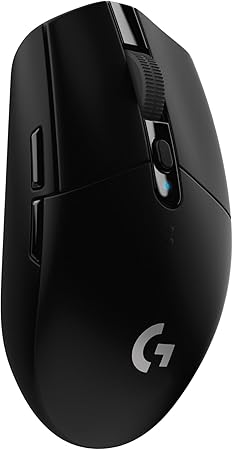
1. Logitech G305 Lightspeed Wireless Gaming Mouse
The G305 is one of the most popular entry points into competitive wireless gaming. While its shape is ambidextrous and typically smaller than the EC1-CW, it utilizes the reliable LIGHTSPEED technology for a 1ms report rate, making latency virtually non-existent. It features the efficient Hero 12K sensor and offers fantastic battery life, providing reliable performance for competitive play without the premium price tag.

2. Razer Basilisk V3 X HyperSpeed Customizable Wireless Gaming Mouse
The Razer Basilisk V3 series provides a highly ergonomic shape comparable to the comfort of the EC1-CW, particularly for palm grippers, complemented by a dedicated thumb rest. This HyperSpeed wireless version ensures low latency necessary for fast-paced gaming and boasts a high-resolution 18K optical sensor. For users who want ZOWIE-like comfort blended with modern programmable features and long battery life, the Basilisk is an excellent contender.

3. ATTACK SHARK MAMBASNAKE M2 Wireless Gaming Mouse
If your primary motivation is raw speed and minimal mass, the MAMBASNAKE M2 offers an extreme departure from the heavy feel of many ergonomic mice. At just 41g, this carbon fiber mouse uses a top-tier PAW3395PRO sensor and offers up to 40,000 DPI. While the design is skeletal, the performance is built for competitive aiming, offering triple connectivity (Wired/BT/2.4GHz).

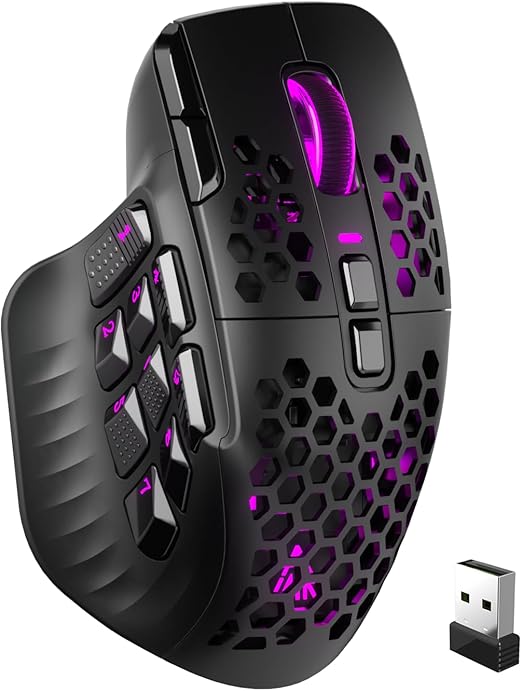
4. SOLAKAKA SM809 Pro Gaming Mouse (MMO Focus)
For gamers needing a highly contoured shape combined with macro flexibility, the SM809 Pro is worth consideration. It offers a large, hand-filling ergonomic design similar to what palm grippers appreciate in the EC1-CW, but adds nine programmable side buttons and a 24,000 DPI sensor, making it ideal for complex games like MMOs or strategy titles that benefit from rapid keybind access.
Deep Dive into Ergonomics: Finding the Right Grip and Size
One of the primary reasons users seek the EC1-CW is its unmatched asymmetric shape, which is perfectly sculpted for right-handed users. This specific contour supports the palm and aligns the wrist, which is crucial for reducing fatigue during extended gaming sessions. When choosing an alternative, understanding your exact grip style—be it palm, claw, or fingertip—is paramount.
Asymmetric vs. Ambidextrous Shapes for Gaming
While many lightweight gaming mice are now ambidextrous (symmetrical) for flexibility and lighter weight, the EC1-CW is proudly asymmetric. Asymmetric mice offer superior wrist support by providing a natural slope. If you prefer the dedicated comfort of a larger, shaped mouse, prioritizing other ergonomic options is key.

5. Logitech G502 Hero High Performance Wired Gaming Mouse
The G502 Hero is the king of feature-rich ergonomic mice, utilizing a deep contour and customizable weight system. Although it is a wired option, its shape provides exceptional palm support and features a high-end 25K DPI sensor. For users who value stability, weight customization, and multiple programmable buttons over wireless freedom, the G502’s famous design remains a stellar choice, capturing the ‘full-hand’ feel of the EC1-CW.

6. Redragon M908 Impact RGB LED MMO Gaming Mouse
If you love the large, robust feel of the EC1 series but require additional macro keys for titles beyond FPS, the Redragon M908 offers an aggressive, ergonomic shape with a massive 12-button side cluster. This mouse prioritizes functionality and hand-filling comfort, offering up to 12,400 DPI precision and 18 programmable shortcuts for complex commands.
Beyond Gaming: Wireless Ergonomic Mice for Daily Productivity
While the EC1-CW is optimized for esports, many users require a comfortable wireless mouse for both intensive gaming and long workdays. Ergonomic designs are critical for preventing long-term wrist strain and conditions like carpal tunnel syndrome. The following alternatives prioritize comfort and long-term usability, offering unique ergonomic features.

7. Anker 2.4G Wireless Vertical Ergonomic Mouse
The vertical mouse design is the ultimate solution for wrist health. By orienting the hand into a natural handshake position, the Anker Vertical Mouse significantly reduces forearm pronation and wrist tension. While not optimized for high-speed twitch gaming, it is the best alternative if your primary concern is alleviating wrist pain and improving posture during long hours of computer use.

8. Incase Bluetooth Ergonomic Mouse (Designed by Microsoft)
Designed with the legacy of Microsoft’s focus on long-term comfort, this Incase mouse features a sculpted ergonomic body, a prominent thumb rest, and precision tracking. Its ability to connect to three devices via Bluetooth makes it an exceptional productivity mouse. Users seeking the stable, supportive feel of a full-size ergonomic mouse for mixed professional and light gaming use will find this model reliable.

9. Logitech M510 Wireless Mouse
A benchmark in full-size office ergonomics, the M510 offers a traditional but heavily contoured shape that provides generous palm support. Using Logitech’s Unifying Receiver, it guarantees stable wireless connectivity and reliable tracking for everyday tasks. While not a high-DPI gaming mouse, its substantial size and curved body are excellent for minimizing strain during long periods of general computing.
Choosing the Right Wireless Technology: 2.4GHz vs. Bluetooth
The ZOWIE EC1-CW uses a proprietary 2.4GHz wireless connection because it delivers a signal fast enough for competitive esports (typically 1000 Hz polling rate). Standard Bluetooth connections often introduce latency that, while unnoticeable in office work, can cost critical milliseconds in titles like Valorant or CS:GO.
When selecting your alternative, decide if absolute zero-lag performance is necessary. Mice using dedicated USB dongles (like Logitech LIGHTSPEED or Razer HyperSpeed) are engineered for this speed. Mice focusing on dual modes (2.4GHz + Bluetooth) offer the most versatility.

10. TECKNET Wireless Mouse (Dual Mode Connectivity)
For users who switch frequently between a desktop (requiring 2.4G stability) and a laptop or tablet (preferring Bluetooth convenience), this TECKNET model is a powerful compromise. It offers dual-mode connectivity and is rechargeable, ensuring minimal downtime and maximum compatibility across your entire tech ecosystem. The ergonomic shape and silent clicks also make it excellent for quiet, shared workspaces.
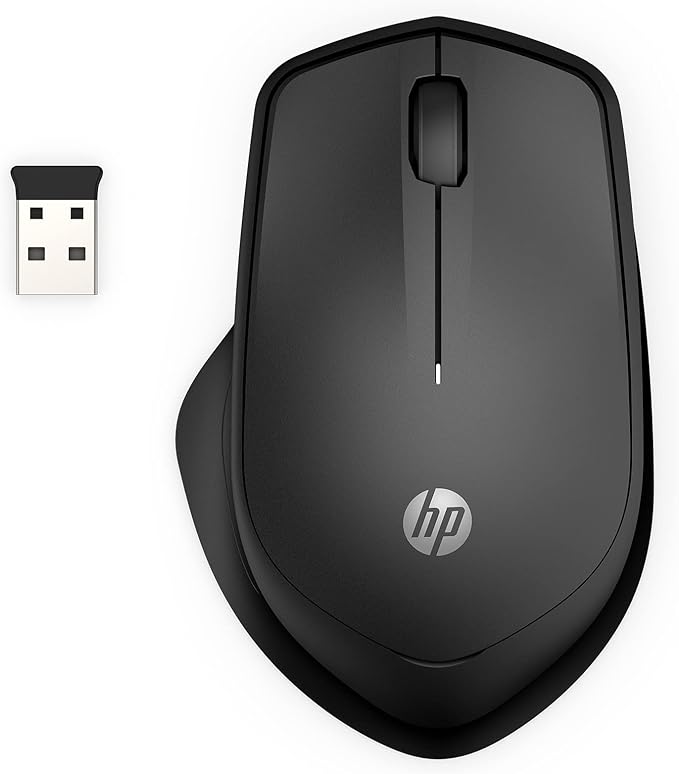
11. HP 280 Silent Wireless Mouse
Offering an 18-month battery life and a dedicated right-handed ergonomic design, the HP 280 caters directly to the need for sustained comfort in a traditional shape. Utilizing a 2.4GHz USB connection, it provides reliable, plug-and-play functionality. The silent click feature is a huge benefit for those working in quiet environments.

12. Razer DeathAdder Essential Gaming Mouse (Wired)
If the priority is the EC-style ergonomic shape and competitive gaming heritage, but you are willing to sacrifice wireless freedom for stability or budget, the Razer DeathAdder Essential is a cornerstone of PC gaming. It shares a similar high-arch, right-hand ergonomic profile with the ZOWIE EC, providing exceptional comfort for palm grip users. Its 6400 DPI sensor and mechanical switches ensure instant responsiveness.

13. GravaStar Mercury M2 Wireless Gaming Mouse
For gamers seeking cutting-edge performance combined with unique aesthetics, the GravaStar Mercury M2 uses the high-end PAW3395DM sensor (up to 26,000 DPI) and maintains a low 79g weight through its hollowed-out design. It offers competitive wireless technology and programmable buttons, making it a compelling, high-spec wireless mouse for fingertip and claw grip users who value lightweight maneuverability.

14. TECKNET Ergonomic Wireless Vertical Mouse
Similar to the Anker model, this TECKNET vertical mouse is specifically aimed at users suffering from repetitive strain injury (RSI) or carpal tunnel discomfort. Its vertical tilt forces the wrist into a neutral, unstressed position. Featuring 4800 DPI optical tracking and dual-mode (2.4GHz/Bluetooth) connectivity, it provides excellent precision for productivity while prioritizing health and comfort above all else.
Critical Performance Metrics Comparison
When migrating from a high-tier mouse like the ZOWIE EC1-CW, gamers must scrutinize the sensor technology and latency. While ZOWIE focuses purely on raw tracking performance, modern alternatives offer higher DPI, though DPI often matters less than the quality of the sensor itself (like the HERO or PAW3395 series).
Sensor Precision and Response Time
The best wireless gaming mice listed here, such as the Razer Basilisk V3 X HyperSpeed and the Logitech G305, utilize optimized 2.4GHz connections (HyperSpeed and LIGHTSPEED, respectively) that deliver 1ms or near-1ms response times. This responsiveness is the closest equivalent to ZOWIE’s wired or CW wireless line, ensuring there is no input lag during critical moments.
Furthermore, sensor quality determines how accurately the mouse translates movement. Mice featuring high DPI counts (like the ATTACK SHARK M2 at 40,000 DPI) offer exceptional granularity, allowing players who prefer extreme sensitivity to fine-tune their settings far beyond what a standard office mouse provides.
Grip Surface and Material Quality
The EC series is known for its shell material designed to offer grip even when hands become sweaty. While many alternatives focus on honeycomb structures for weight reduction (like the GravaStar M2), others, such as the Razer Basilisk V3, incorporate rubberized grips or textured coatings to ensure maximum control during intense matches. If the original ZOWIE feel is your preference, look for mice with matte or slightly rough finishes that resist slippage.
The Importance of Battery Life in Wireless Gaming
Wireless mice, especially those used for gaming, demand robust battery performance. The constant high polling rate (1000 Hz) drains power quickly. The ZOWIE EC1-CW is highly regarded for its longevity. When selecting an alternative, consider the balance between rechargeable internal batteries (convenient but heavy) versus AA/AAA battery usage (lighter, but requires replacements).
- Logitech G305: Utilizes a single AA battery to achieve an impressive 250 hours of continuous gaming, maximizing uptime and simplifying power management.
- TECKNET Models: Often prioritize rechargeable internal lithium batteries, offering convenience and reducing environmental waste, though capacity varies based on usage mode (2.4G vs. Bluetooth).
- Razer Basilisk V3 X HyperSpeed: Boasts up to 535 hours on 2.4GHz mode, positioning it as an ultra-low maintenance, high-performance option.
For serious competitive players, having a backup plan—like the option to quickly plug in a charging cable and continue playing (wired)—is non-negotiable. Ensure your chosen wireless alternative supports this “play-and-charge” functionality if absolute continuous connectivity is required.
Final Verdict: Choosing Your Next Wireless Ergonomic Champion
The ZOWIE EC1-CW set a high bar for ergonomic wireless gaming, marrying a classic shape with competitive speed. If you are specifically seeking an alternative, your choice depends heavily on prioritizing either raw gaming performance or long-term ergonomic comfort.
If competitive, low-latency wireless FPS performance is your non-negotiable requirement, the Razer Basilisk V3 X HyperSpeed offers a superb combination of ergonomic shape, advanced sensor technology, and reliable wireless speed. It’s the closest modern equivalent in terms of comfort and feature depth for a high-performance setup.
If your usage leans more toward general computing, productivity, and health relief, the Anker 2.4G Wireless Vertical Mouse or the TECKNET Ergonomic Vertical Mouse provides the greatest alleviation from wrist and hand fatigue, fundamentally changing your interaction with the computer for the better.
Ultimately, the best replacement for the EC1-CW is the one that fits your hand and your gameplay budget perfectly. Evaluate your grip, determine your need for wireless speed, and select the mouse that best supports your personal ergonomic and performance demands.